Lenovo Legion Pro 34Wd 10 Oled First Look: Unboxing and Impressions
Introduction
The Lenovo Legion Pro 34Wd 10 Oled arrives at a moment when OLED technology is increasingly popular among gamers and creative professionals who demand deep blacks, high contrast and instant pixel response. This first-look review covers unboxing impressions, design and build, display performance, practical use cases, connectivity and ergonomics, as well as the trade-offs potential buyers should consider. The goal is to provide a balanced, useful editorial perspective for shoppers weighing this monitor against other ultrawide options.
Unboxing and First Impressions
Out of the box, the Legion Pro 34Wd 10 Oled presents as a premium ultrawide. The package typically includes the monitor, a height- and tilt-adjustable stand, a DisplayPort cable, an HDMI cable, a USB upstream cable (for hub functions), a power cord and basic documentation. The unboxing experience is unremarkable in the best way: accessories are sensible and oriented toward both desktop setups and console users who might want HDMI out of the box.
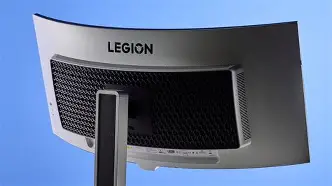
Initial impressions are dominated by the screen itself. OLED's signature deep blacks are immediately visible in a dim room; shadow detail and local contrast feel markedly different from even high-quality IPS ultrawides. The chassis language follows Legion's gamer-heavy aesthetic—sturdy matte plastics, small vents, and a logo treatment that aims for a balance between subtlety and presence.
Design and Build
The Legion Pro 34Wd 10 Oled uses a functional design approach. The stand offers height and tilt adjustments and detaches cleanly for VESA mounting, which will matter to buyers with monitor arms or multi-monitor desks. The bezel is reasonably slim at the top and sides, making the display unobtrusive on a desktop. Materials feel solid without being flashy—aluminum accents are minimal and practical rather than decorative.
From a day-to-day perspective, the stand provides a stable base for a 34-inch panel and has enough adjustment to align the monitor to a typical seated workstation. Cable routing is modestly managed through a cutout in the stand, and the monitor's footprint is compact for an ultrawide—helpful for smaller desks.
Display and Image Quality
The headline feature is the OLED panel. Buyers can expect:
- Deep black levels and high contrast: OLED pixels emit light independently, creating near-infinite contrast on scenes with both bright highlights and deep shadows.
- Vivid color rendition: Colors appear lively and saturated, which benefits both gaming and content consumption. For creative work, calibrated profiles and built-in color modes are important to achieve consistent results.
- Instant pixel response: Motion clarity is excellent for fast-paced content. This is one of OLED’s advantages over IPS technology when it comes to perceived blur in games or videos.
Potential limitations include typical OLED concerns such as peak brightness for HDR specular highlights and long-term image retention risk. In bright rooms, OLED screens can appear less luminous than some high-end LCDs tuned for high nit HDR. However, for most indoor scenarios the contrast and color fidelity deliver a striking image that many users find more immersive than comparable LCD panels.
Performance: Gaming and Everyday Use
In gaming, the Legion Pro 34Wd 10 Oled’s intrinsic strengths—deep contrast and fast response—translate to an immersive experience. Dark scenes feel more defined, and HDR-capable titles benefit from the panel’s ability to render bright highlights and saturated colors. Competitive players will want to verify the panel’s variable refresh rate (VRR) support and the monitor’s advertised refresh rate for their platform; the real-world feel is one of fluid motion and low perceived smear.
For everyday productivity, the 21:9 ultrawide format is a boon. It removes the need for multi-monitor bezels in many workflows: a wide timeline in video editing, side-by-side app windows for research and composition, and extended spreadsheet columns all fit naturally on a 34-inch ultrawide. The OLED’s color quality is advantageous for photo and video editing if the unit is properly calibrated.
Shop the latest Laptops & Computers picks on Amazon.
View Offers →Input lag and overall responsiveness are typically competitive with other high-end gaming monitors. Still, professionals in esports or latency-sensitive disciplines should check measured input-lag reviews to match their needs. For the majority of users—content creators, casual gamers, and productivity-focused buyers—the balance of color fidelity and responsiveness will be compelling.
Connectivity and Built-in Features
The Legion Pro 34Wd 10 Oled aims to be a flexible centerpiece for mixed-use desks. Expected connectivity includes multiple display inputs (DisplayPort and HDMI), a USB upstream port for hub functionality, and downstream USB ports that work well for peripherals. USB-C with DisplayPort alt mode and power delivery would be a useful feature for laptop users who want a single-cable dock experience; buyers who need this should confirm the specific model configuration before purchase.
Onscreen display (OSD) menus in Lenovo monitors tend to be pragmatic with gaming-focused presets, color modes, and picture controls. Hardware calibration options—such as 10-bit support or factory-calibrated color profiles—are valuable for creators. In addition, built-in speakers are often serviceable for casual use but will typically fall short of desktop speaker setups or headphones for critical listening.
HDR, Brightness and OLED Considerations
OLED handles HDR differently from LCD. Instead of relying on localized dimming zones, OLED achieves contrast with per-pixel emission. That yields true blacks and convincing contrast in mixed scenes. Where OLED panels sometimes lag behind high-end mini-LED LCDs is in peak brightness: spec sheets can show significant differences in nit peak output. For scenes with tiny high-luminance specular highlights, some LCDs may render a slightly more dazzling effect; however, the overall HDR experience on OLED is frequently praised because of the panel's contrast.
Buyers should consider the long-term behavior of OLED: image retention and burn-in remain a technical risk. Manufacturers mitigate this with pixel-shifting, screen savers, and pixel-refresh utilities. For users with static UI elements—like stream overlays, HUDs or productivity toolbars—taking common-sense precautions (varying content, using taskbar auto-hide, and applying screen savers) will reduce risk.
Calibration and Color Accuracy
Out of the box, color balance on premium OLEDs tends to be very good, but professional users who require consistent results will want to invest time in calibration. A colorimeter and calibration software can produce a reliable profile for sRGB, DCI-P3 or Rec.709 depending on workflow needs. The monitor’s factory calibration (if provided) and included color modes may already suit general photo and video edits, but hard color targets like print RGB or broadcast Rec.709 are best validated with external measurement.
Real-world Use Cases
The Legion Pro 34Wd 10 Oled fits several buyer archetypes:
- Creative professionals: Photographers and video editors who prioritize color and contrast will appreciate OLED’s rendition for grading and color-critical previewing, provided they follow a calibration workflow and understand brightness limits.
- Immersive gamers: Players who enjoy single-player, story-driven, and atmospheric titles will find the richness of color and contrast a major plus. Ultralarge FOVs in sim and RPG titles are more engaging on a 21:9 canvas.
- Productivity-focused users: Multitaskers who want to replace dual monitors with one seamless workspace will value the horizontal real estate for spreadsheets, timelines and side-by-side windows.
- Mixed laptop/desktop desks: Users who switch between a desktop PC and a laptop want flexible inputs and a monitor that can act like a hub. USB-C with power delivery (if present) and an integrated USB hub simplify these setups.
Pros & Cons
- Pros:
- Exceptional contrast and deep blacks — OLED delivers unmatched shadow detail for most viewing conditions.
- Vibrant color and strong out-of-the-box vibrancy — suitable for media and gaming enjoyment immediately.
- Immersive ultrawide format — excellent for productivity and cinematic gaming experiences.
- Fast pixel response — noticeable improvement in motion clarity over many IPS panels.
- Cons:
- Potential burn-in/image retention risk — requires mindful usage patterns for static UI elements.
- HDR peak brightness trade-offs — very bright specular highlights may be less intense than on some mini-LED LCDs.
- Price premium — OLED ultrawides often sit above mainstream IPS alternatives.
- Limited absolute certainty on connectivity variants — buyers must verify USB-C power delivery and specific port configurations per SKU.
Comparison Table
| Feature | Lenovo Legion Pro 34Wd 10 Oled | Alienware AW3423DW (Representative) | LG 34GP950G (Representative) |
|---|---|---|---|
| Panel Type | Ultrawide OLED — deep blacks and high native contrast | QD-OLED — strong color and contrast, gaming-focused | Nano IPS — bright highlights and wide color gamut |
| Size / Aspect | 34" / 21:9 ultrawide | 34" / 21:9 ultrawide | 34" / 21:9 ultrawide |
| Resolution | Ultrawide QHD (typical 3440×1440 class) | 3440×1440 | 3440×1440 |
| Refresh Rate | High refresh (varies by SKU and connection) | High refresh (often up to 175Hz) | High refresh (160Hz+ depending on model) |
| VRR / Adaptive Sync | Expected VRR support (G-Sync/FreeSync variable across models) | G-Sync Ultimate / VRR-capable | FreeSync / G-Sync compatible |
| HDR | OLED HDR: excellent contrast, specular highlight depends on peak brightness | OLED HDR: excellent contrast and color | HDR: benefits from higher peak brightness on IPS |
| Best For | Immersive single-player gaming, creatives, productivity ultrawide | Color-accurate gaming and creatives seeking OLED characteristics | Competitive gamers who want high brightness and wide gamut |
| Price Positioning | Premium — OLED usually commands higher cost | Premium — QD-OLED often priced at a premium | High — faster IPS options priced competitively |
Buying Guide: Who Should Consider the Legion Pro 34Wd 10 Oled?
When deciding whether the Legion Pro 34Wd 10 Oled is the right purchase, buyers should consider a few practical questions:
Discover deals on Laptops & Computers — updated daily.
See Deals →1. What is the primary use case?
If the primary need is cinematic single-player gaming or color-rich content creation, an OLED ultrawide can provide a more engaging visual experience than many LCD alternatives. For heavy competitive esports play where absolute peak brightness and the lowest possible input lag are paramount, the buyer might also consider high-refresh IPS options and check measured input-lag numbers.
2. Is the work pattern compatible with OLED?
Users who keep static toolbars or game HUDs on screen for extended sessions should adopt strategies to reduce burn-in risk: enable auto-hide taskbars, use dark-mode UIs sparingly, switch screen content, employ pixel-shift features and take advantage of any manufacturer-provided pixel-refresh utilities. Office workers with static spreadsheets or terminals may prefer LCD if they cannot avoid static content for long periods.
3. What desk setup and connectivity are required?
Check for USB-C with power delivery if connecting laptops is a priority. Confirm the number and types of downstream USB ports if the monitor is intended to serve as a peripheral hub. VESA compatibility and stand ergonomics matter for multi-monitor arrays or monitor-arm setups.
4. How important is HDR peak brightness?
For buyers who prioritize bright specular highlights for HDR content, compare measured peak brightness figures. OLEDs excel at contrast but can be outshone in terms of raw nit output by some mini-LED LCDs. Assess typical viewing conditions—if the monitor will be used largely in a dim-to-moderate ambient lighting environment, OLED’s contrast advantage may be preferable.
5. Budget and long-term ownership considerations
Expect a price premium for OLED technology. Factor in warranty terms and any manufacturer policies regarding burn-in or image retention. A longer or more comprehensive warranty can provide peace of mind for buyers planning to use the display heavily over several years.
Tips for Purchasing and Setup
- Verify exact SKU features: Manufacturers often ship different configurations. Confirm refresh rate, port layout and whether USB-C PD is included in the specific model being purchased.
- Plan for calibration: Even with good factory defaults, color-critical workflows benefit from a hardware calibration tool and a measured profile.
- Manage static UI elements: Use OS features to hide taskbars or auto-hide docks and alternate the layout of frequently used tool panels.
- Consider ambient lighting: OLED looks best in moderate to low ambient light for maximal perceived contrast; consider monitor placement to avoid bright window glare.
- Check return and warranty policies: Confirm the retailer and Lenovo's policies on returns and coverage, especially regarding potential burn-in claims.
Conclusion
The Lenovo Legion Pro 34Wd 10 Oled makes a persuasive case for buyers who want an immersive ultrawide experience with the distinct visual strengths of OLED—deep blacks, vivid colors and responsive motion. It suits creative professionals seeking a high-contrast preview monitor, gamers who value atmosphere and color fidelity, and productivity users who appreciate widescreen real estate.
Trade-offs include potential burn-in concerns, HDR peak brightness relative to some high-end LCDs, and a likely premium price. These are manageable for many buyers with appropriate usage habits and setup choices. Ultimately, the Legion Pro 34Wd 10 Oled stands out as a compelling option in the growing field of OLED ultrawide monitors, provided buyers weigh their own priorities—static UI exposure, HDR brightness needs, and budget—before committing.